Troubleshooting SSH login problem

If you are unable to login using ssh, please follow the instructions below.
  1. Select "File/Preference" menu from the VirtualBox main menu bar.

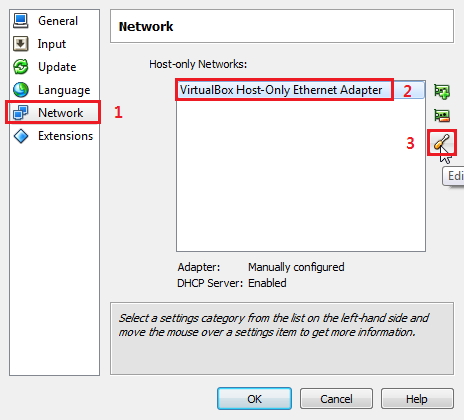
  2. The following dialog box will appear. Select "Network" in the left column, "VirtualBox Host-Only Ethernet Adapter" in the middle and then "Edit" icon (the screw-driver icon).

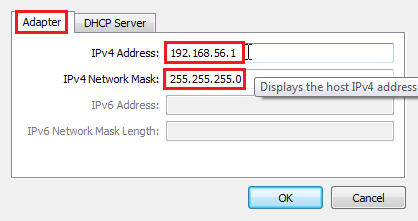
  3. The following dialog box will appear. Select "Adapter" tab at the top.

    Make sure that "IPv4 Address:" field has 192.168.56.1 and the "IPv4 Network Mask" field has 255.255.255.0. If not, update the values in the two fields and press "OK".

    The host OS may prompt you to give permission for certain operations. Please answer "YES" for all these requests.